%20(1920%20x%201080%20px).png)

Before you spend 40 hours learning Webflow, let's figure out if DIY is actually the right move for your small business. No judgement either way. This is just math.

DIY makes sense if:
DIY probably isn't the move if:
The honest math: If your time is worth $75/hour and building takes 40 hours, that's $3,000 of your time. A professional one-page website in Canada starts at $1,500 and is done in a day. Do the math before you start.
The hybrid option: Build something simple to get live fast. Get clients. Get revenue. Hire someone to rebuild it properly when you're ready to grow. A live imperfect website beats a perfect one that never gets finished.
Jumping into a website builder without your content ready is the number one reason DIY websites never get finished. Get these four things sorted first.
Wix is easy to start and hard to be proud of. Wix sites look like Wix sites, load slower than they should, and hit walls fast when you want to do anything outside the template. Fine for a placeholder. Not great for a business that wants to be taken seriously.
Squarespace produces beautiful sites within a narrow aesthetic range. You're fitting your business into their templates, not designing something that fits your brand. Good for photographers. Limiting for most small businesses.
WordPress powers 40% of the internet and is incredibly powerful — and a plugin-dependent nightmare that requires ongoing maintenance, security updates, and the occasional 3am panic. Great if you have technical support. Overkill if you don't.
Webflow is what we build every brite site on — and what we recommend for DIY if you're serious about the result. Complete design freedom, clean fast code that Google loves, no plugins to break, built-in CMS, and you can update your own content without touching a line of code. The learning curve is real, but Webflow University is free and genuinely excellent. Start with the Webflow 101 Crash Course.
Step 1: Create your account Webflow.com — free to build, paid to publish. Hosting starts at around $14 USD/month. Fully tax deductible as a Canadian business expense.
Step 2: Template or blank canvas Starting from a template is a legitimate shortcut for your first build. Just customize it enough that it doesn't look like a template. If you have design confidence, start from scratch.
Step 3: Set up global styles first Before you build a single page, add your brand fonts, set your colour swatches, and define your text styles — H1, H2, H3, paragraph. Do this once and every element you add inherits your brand automatically. Skip it and spend hours fixing inconsistencies later.
Step 4: Build pages in this order
Step 5: Check mobile responsiveness Over 60% of web traffic is on mobile. Check every page at mobile, tablet, and desktop before publishing. The most common disasters: text too small to read, buttons too small to tap, images overflowing the screen, nav menus that collapse into chaos.
Honest answer: it depends on your business. Not every small business needs five pages — and nobody should pay for pages they don't need.
You probably need one page if:
You probably need multiple pages if:
One well-built page that loads fast, looks sharp, and tells people exactly what to do next will outperform a bloated five-page site every time. This is exactly why our most popular package — a Little bs — is one page, built in one day, starting at $1,500.
Homepage: Tell visitors what you do, who you do it for, and what to do next — in three seconds or less. One headline, one primary CTA, some social proof, an overview of services, and a second CTA at the bottom. Do not try to say everything at once.
About page: People hire people, not businesses. Be human. Tell your story. Put a real, current photo of yourself on this page — a photo builds more trust in half a second than three paragraphs of copy.
Services page: List what you offer. Include what it is, who it's for, what's included, and what it costs. Pricing transparency builds trust and filters out the wrong clients before they contact you. If you're not ready for exact prices, show a starting price — "from $500" is better than "contact us for pricing."
Portfolio page: Show your work. No client work yet? Create sample projects or do something pro bono. Something always beats nothing.
Contact page: Name, email, phone, city, service area. Keep your form short — every extra field reduces submissions. Add your location in plain text for local SEO.
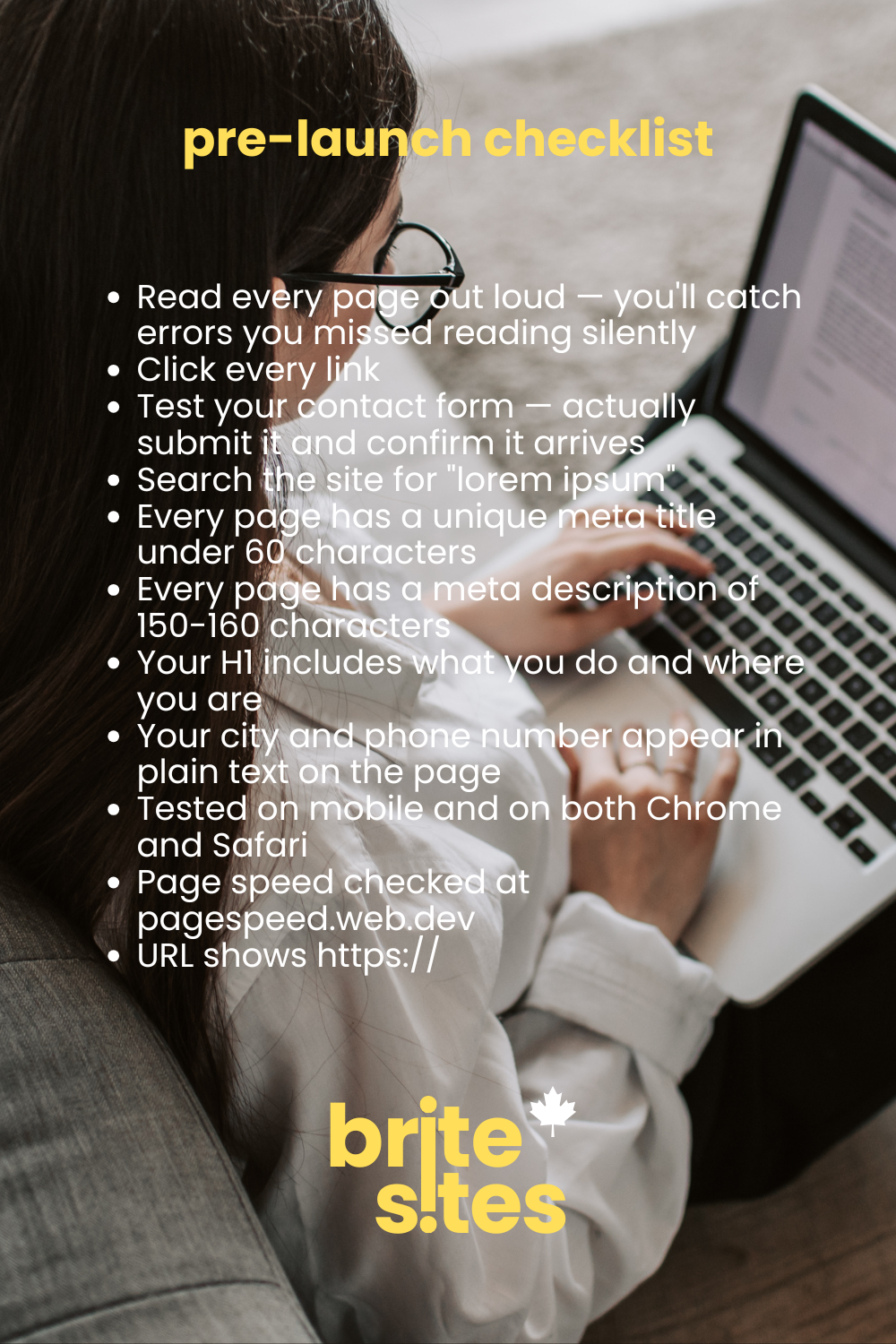
Before you hit publish:
After you publish:

It might be time to hand it off if:
brite sites is a queer-owned web design company born and built in Oshawa, Ontario. We build custom websites for Canadian small businesses at flat rates — starting at $1,500, delivered in as little as one day. No templates. No subscriptions. No lock-in. You own your site from day one.
Good bs, delivered fast. britesites.ca
get good bs in your inbox. no spam, no fluff, just the good stuff from brite sites.
sign up.webp)
brite sites is canada's hottest web design company. queer owned and operated. proudly canadian. good bs, delivered fast. © 2026 brite sites. all rights reserved.

.png)